
Sailor Piece Quest Tracking Guide
Quest Tracking in Sailor Piece is a helpful feature that shows a marker on your screen to indicate which quest you should take on. It is designed to make questing easier by giving players a clearer sense of direction.
What Is Quest Tracking in Sailor Piece?
Quest Tracking places a visual marker on your screen so you can identify the quest you should follow. This can be especially useful for players who are still learning the map or trying to progress more efficiently.
How to Enable and Read Quest Tracking
In Sailor Piece , the navigation icon can be toggled on or off. When the feature is enabled, it helps guide you toward your next quest objective more clearly.

If the icon is inactive, click it to turn Quest Tracking on.

How Quest Tracking Helps
The feature gives you a clearer path toward your next objective instead of leaving you to search blindly. In Sailor Piece , this makes general quest progression smoother and easier to follow.
Quest Tracking Tip
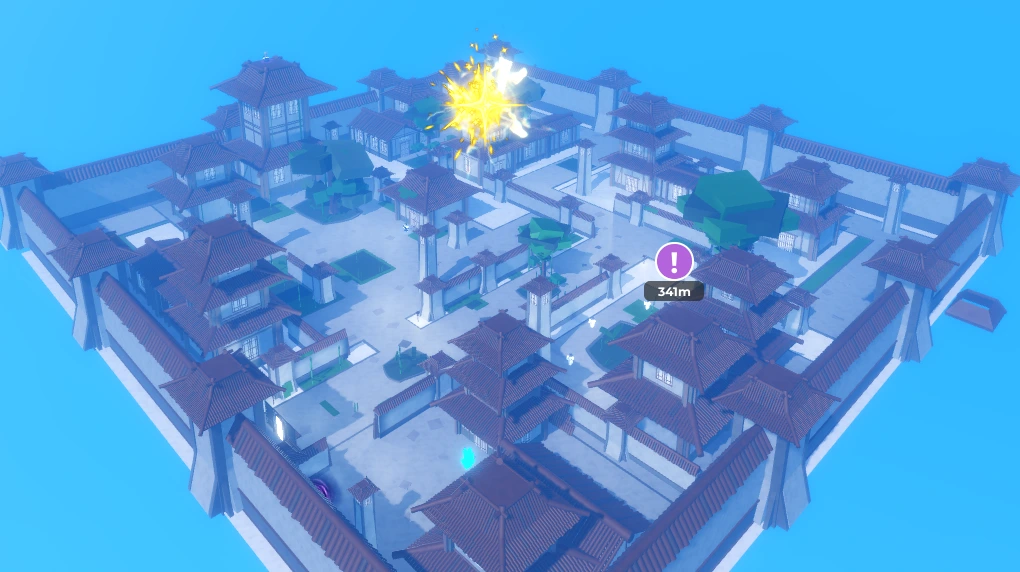
If your navigation indicator is green, look around the area carefully. You may see a purple-marked zone somewhere on the map along with a distance indicator , which can help you locate where to go next.
Summary
Quest Tracking in Sailor Piece is a simple but useful system for finding the next quest more easily. By following the on-screen marker and checking for the purple-marked area when navigation turns green, players can move through quests with less confusion.